

What CI/CD Actually Means?
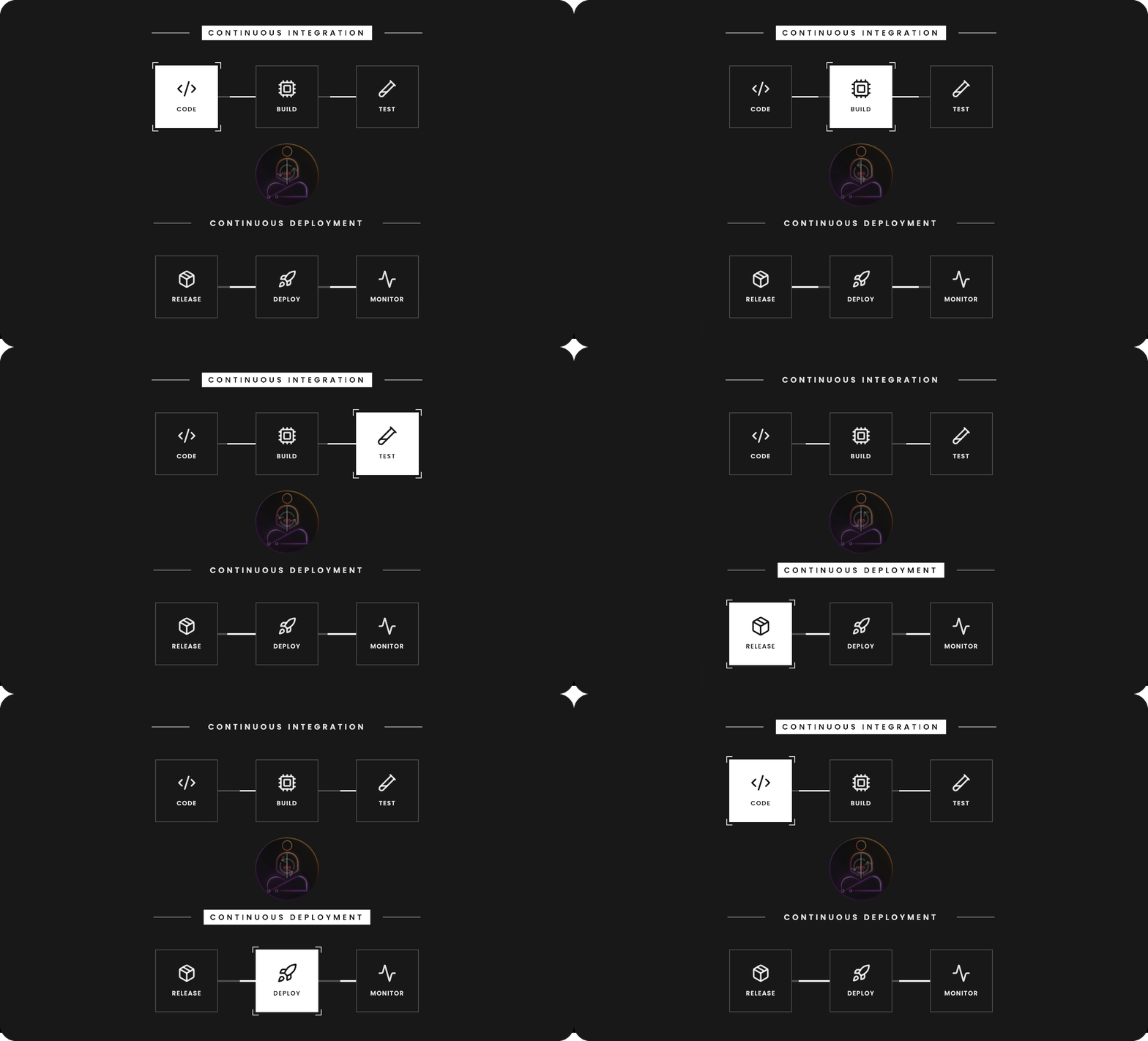
CI/CD stands for Continuous Integration and Continuous Deployment. The two halves solve different problems and are worth understanding separately.
Continuous Integration is about keeping a shared codebase healthy.
Before CI became standard, teams would work in isolation for days or weeks, then attempt to merge everything together at once. The result was integration hell: conflicting changes, broken dependencies, and bugs nearly impossible to trace back to a specific commit.
CI changes the model. Every developer pushes frequently, sometimes multiple times a day. Each push triggers an automated pipeline that runs tests, checks code quality, and verifies the build. If something breaks, you find out within minutes, while the change is still fresh in your mind.
The feedback loop is tight by design.
Continuous Deployment picks up where CI leaves off. Once a change passes all checks, it gets packaged and deployed automatically. No manual handoff. No waiting for a release window.
The combined effect is that the distance between writing code and running code in production shrinks from days to minutes. Teams that ship continuously ship better software because they get real feedback faster, fix smaller problems before they compound, and develop genuine confidence in their deployment process.
The key word in both halves is continuous. Not “sometimes automated.” Not “automated when someone remembers to trigger it.” Continuous means every single change goes through the same process, without exception. When you can bypass CI, its guarantees mean nothing.
GitHub Actions
The Default Starting Point
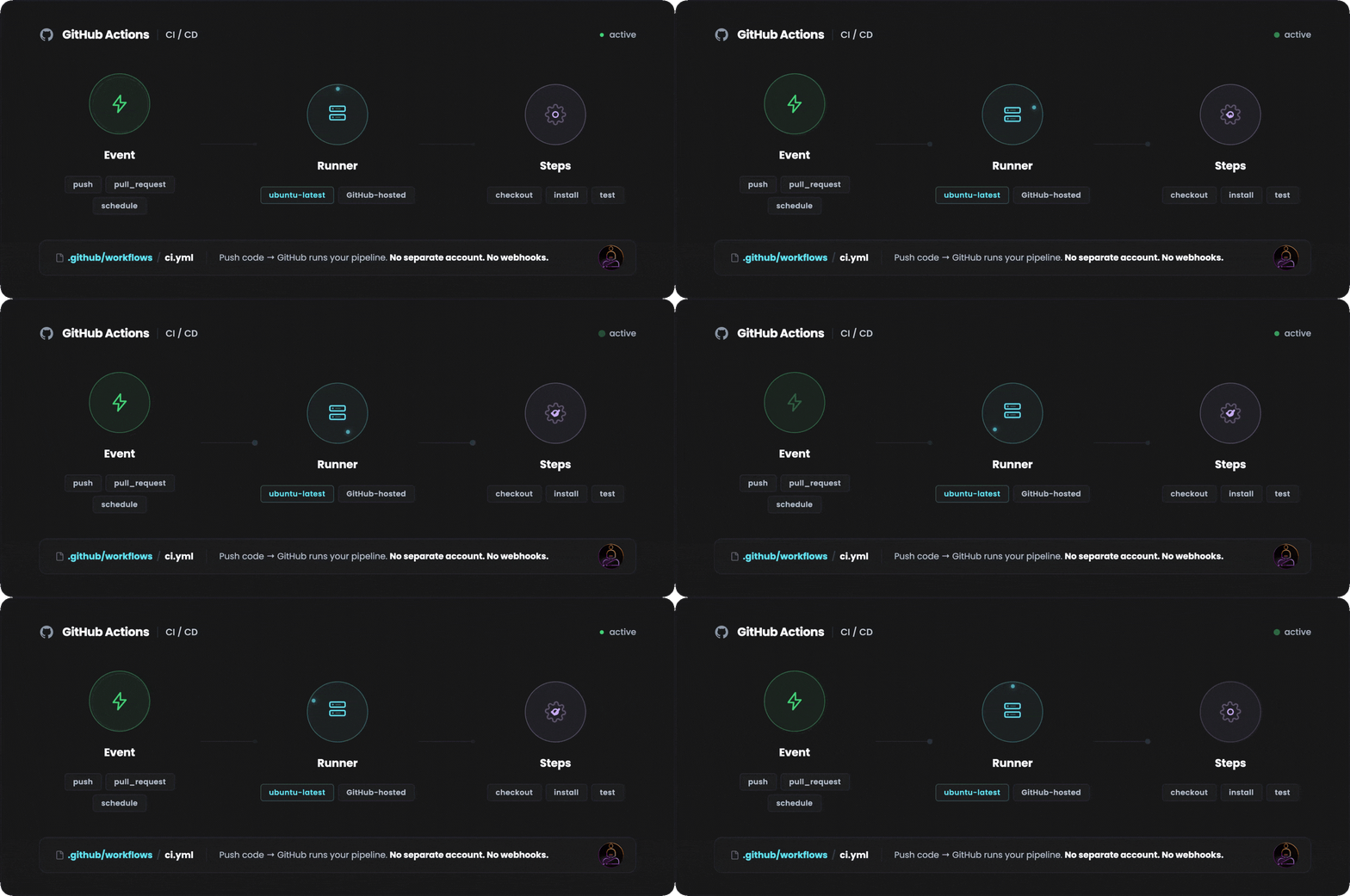
GitHub Actions became the dominant CI/CD platform not because it is the most powerful, but because it lives where the code already is.
No separate account. No webhook configuration. No third-party integration to maintain. You push code to GitHub, and GitHub runs your pipeline.
The core concept is a workflow: a YAML file stored in .github/workflows that defines what should happen and when. Workflows are triggered by events: a push to main, a pull request opened, a tag created, a scheduled cron job.
When the event fires, GitHub provisions a runner, which is a virtual machine hosted by GitHub, and executes the steps you defined.
A basic workflow looks like this:
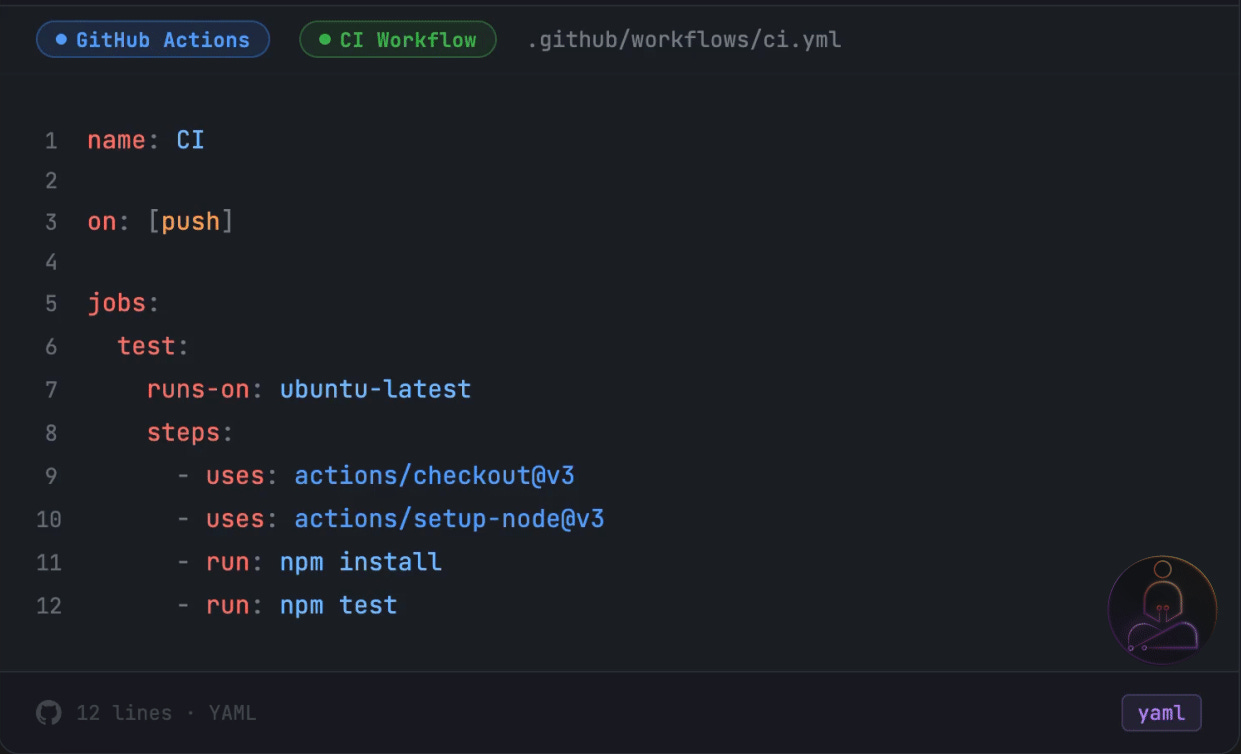
Four things are happening here. The on: block defines the trigger. The jobs: block defines what to run. The runs-on: tells GitHub what kind of machine to provision. And steps: is the actual sequence of commands.
The on: block is worth understanding early because it controls how often your pipeline runs. on: [push] triggers on every push to every branch. Most teams get more specific as the project grows:
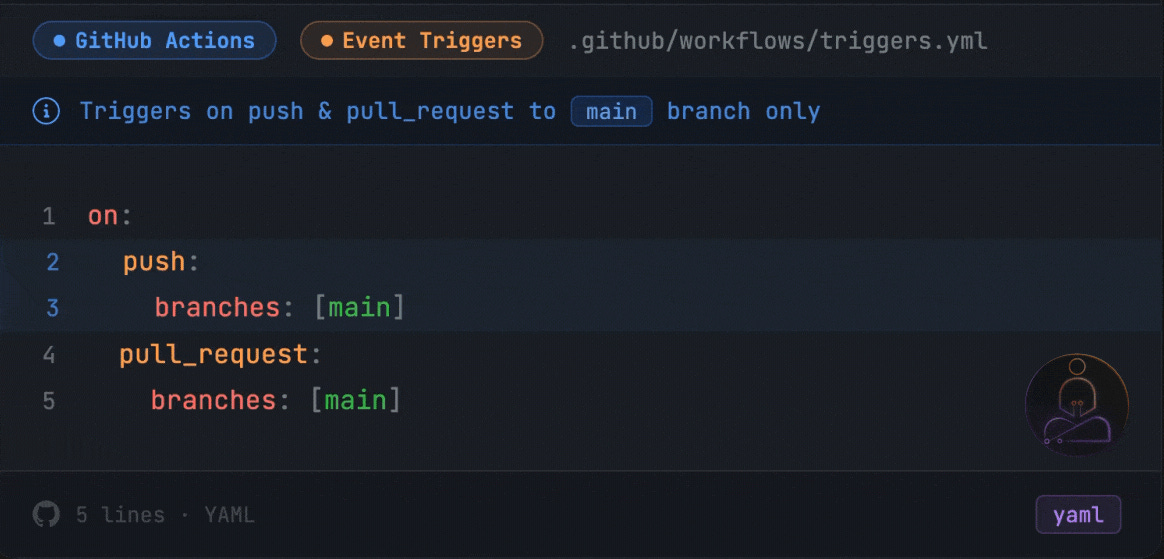
This runs CI only when code touches main, either through a direct push or a pull request targeting it. You can also trigger on tags, scheduled cron jobs, or manual dispatch.
Inside a workflow you can define multiple jobs. By default they run in parallel. If you want one job to wait for another to finish first, you use the needs: keyword:
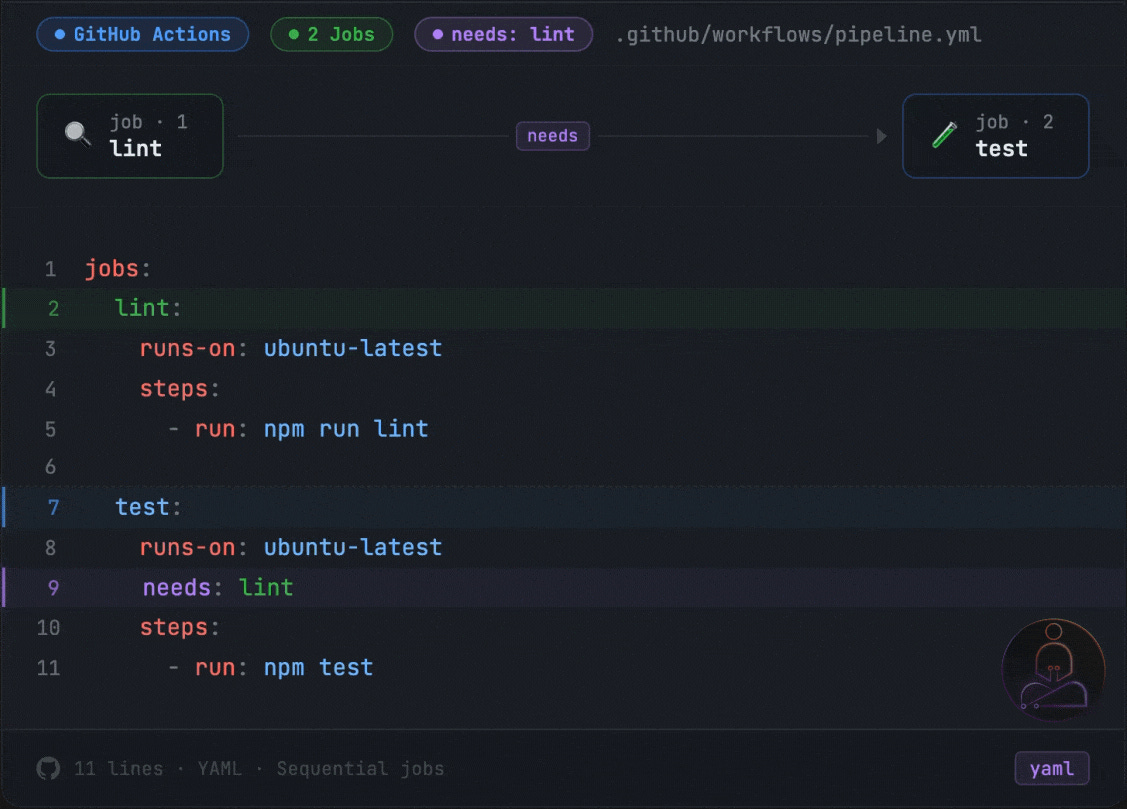
Here test will not start until lint finishes. If lint fails, test never runs. This is a small detail that has a big effect on how you design your pipeline.
What makes Actions useful beyond the basics is its ecosystem. The marketplace has thousands of pre-built actions for deploying to AWS, sending Slack notifications, scanning for security vulnerabilities, and almost anything else a pipeline needs. Most problems have already been solved by someone else. You compose them.
For small and medium projects, this setup works exactly as advertised. The free tier is generous. The feedback loop is fast enough. The tooling is familiar.
Then the project grows.
Where GitHub Actions Starts to Break
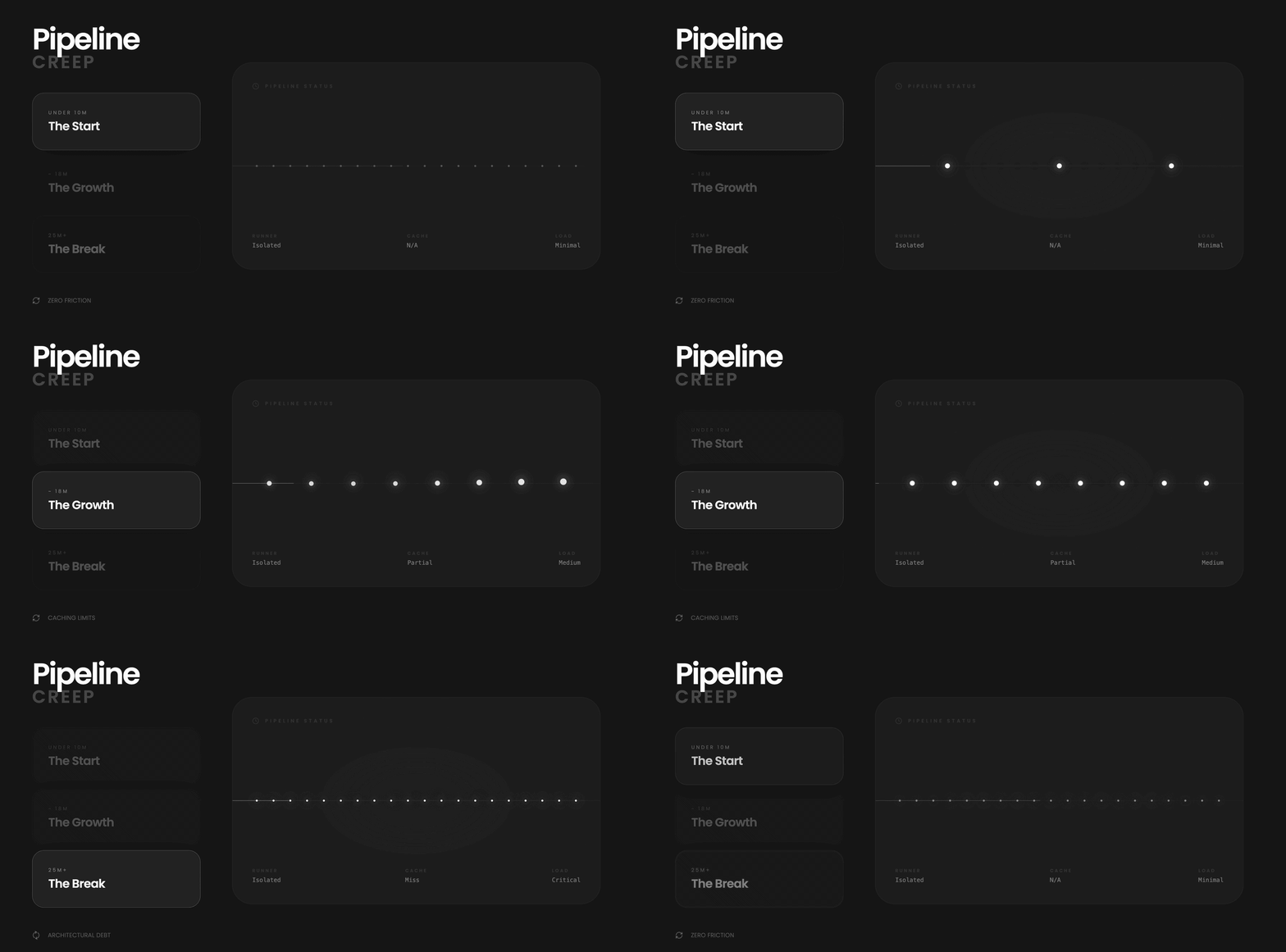
Most teams start with a pipeline that looks something like what we just covered. A few jobs, a handful of steps, done in under 10 minutes. It works well and there is no reason to think about it too deeply.
The problems come gradually, not all at once.
A new service gets added to the repo. The test suite grows as the codebase matures. The Docker image picks up more dependencies. An integration test gets added that spins up a real database. None of these feel like big decisions individually. Each one adds a minute here, two minutes there.
Six months later the pipeline takes 25 minutes.
You add caching. You get it back to 18. It creeps up to 22.
The frustrating part is that nothing feels wrong. The pipeline is doing exactly what you told it to do. You push a one-line fix and watch the same 22-minute pipeline run as if it had never seen your codebase before. Every dependency reinstalled. Every Docker layer rebuilt. Every step from scratch.
This is not a configuration problem. It is an architectural one. And to understand why, you need to understand what is actually happening underneath every GitHub Actions run.
The Stateless Model
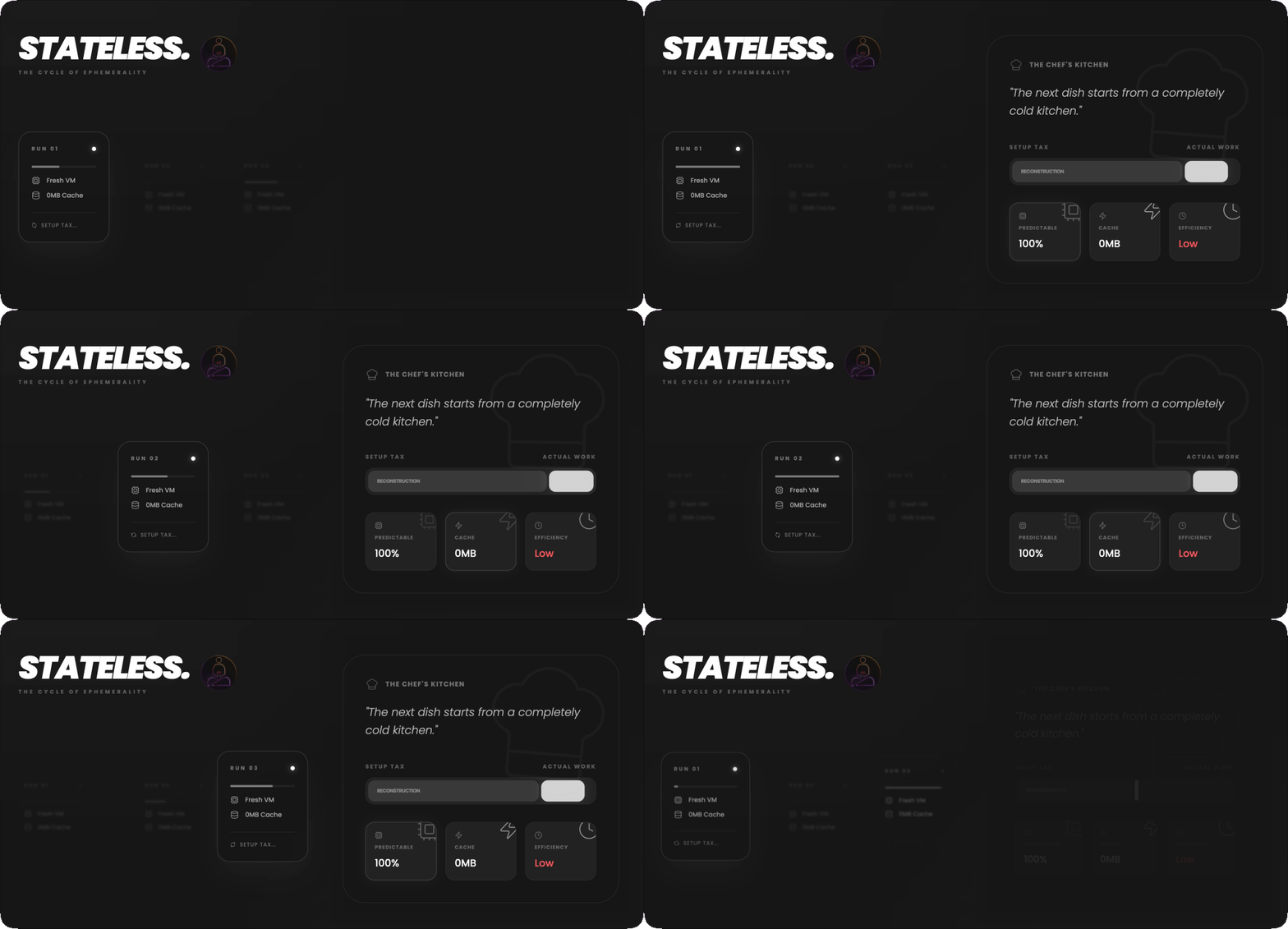
The model underlying GitHub Actions, and most CI platforms, is stateless by design. Every pipeline run gets a fresh virtual machine. The previous run left nothing behind. No memory, no cache that survived, no state of any kind.
When the run starts, it installs your dependencies from scratch. It pulls your Docker base image from a registry. It initializes your build tools. It does all of this even if the exact same work was done an hour ago and nothing relevant changed.
Think of it like a chef who cleans the entire kitchen after every dish. Wipes down every surface, puts everything back in storage, turns off the stove. The next dish starts from a completely cold kitchen. The process is clean and predictable. But it is also slow, and the overhead compounds.
Every CI run pays the full setup tax regardless of what actually changed. The platform is not doing anything wrong. It is faithfully executing the model it was built on.
GitHub Actions has a caching mechanism to help. You can save your node_modules or pip environment between runs using a cache key, usually a hash of your dependency manifest. When the key matches, the cache restores and you skip the installation.
In practice, caching helps at the margins. Cache keys are fragile: if your package.json changes, the cache misses entirely and you reinstall from scratch. Cache restoration adds its own latency. Cache size has limits. And fundamentally, caching is an afterthought layered on top of a stateless model. You are working around the architecture rather than changing it.
Docker builds make this especially visible.
Docker’s layer cache is what makes local builds fast. If a layer has not changed, Docker skips it. But on a fresh CI runner, there is no Docker daemon and no layer cache. Every layer rebuilds from scratch, every time, even if nothing in that layer changed.
The layer cache that makes Docker fast on your laptop disappears completely in a stateless CI environment. A tool designed around persistence, running inside a system designed around ephemerality.
For teams with large images and complex multi-stage builds, the result is pipelines where the actual test execution is a fraction of the total run time. Most of the time is reconstruction: reinstalling dependencies, pulling the same base images, rebuilding layers that have not changed in days. The code changed. The pipeline acts like nothing did.
Slow CI Has a Hidden Cost
The frustration of slow pipelines is obvious. The deeper cost is less visible.
When pipelines are slow, developers start batching their pushes. Instead of small, frequent commits that are easy to review and easy to revert, they accumulate changes and push larger batches to amortize the wait. This is a rational response to a slow feedback loop. But larger changes are harder to review, harder to debug when something breaks, and harder to roll back cleanly.
Slow CI also changes how a team thinks about the pipeline itself. When a run takes 30 minutes, you stop treating it as a real-time feedback mechanism. You push and context-switch to something else. By the time the result comes back, you have lost the thread. The cognitive cost of re-engaging is higher than it looks.
Teams working with AI agents feel this even more acutely. When CI is part of an automated workflow, a slow pipeline becomes a blocking dependency in an otherwise fast chain. An agent that commits and then waits 25 minutes for validation is not a fast agent.
Depot: A Different Architecture
The question worth asking is: what would CI look like if it were designed around persistence instead of ephemerality?
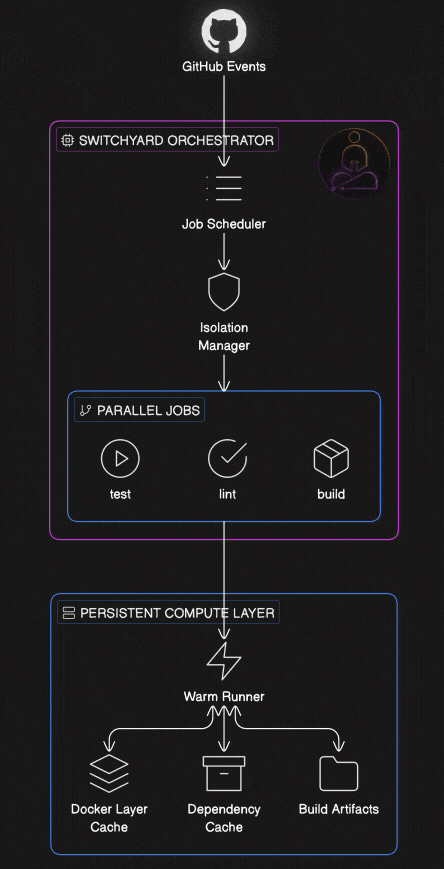
Instead of provisioning a fresh VM per run, you maintain warm compute that knows about your project. The Docker layer cache survives between runs. Dependencies installed yesterday are still there today. The build system has memory. You only do the work that actually changed.
This is not a new idea in computing. Databases do not reconstruct their storage on every query. Servers do not reinstall their runtime on every request. Persistence is the default assumption everywhere except CI, where ephemerality became the standard and workarounds got built around it.
The engineering challenge is preserving isolation while abandoning ephemerality. Each run still needs clean boundaries. A broken pipeline from one team cannot contaminate another. A well-designed persistent system solves this by separating the compute layer from the isolation layer. The underlying machines stay warm and maintain caches. A durable orchestrator sits on top, managing job scheduling and enforcing boundaries between runs. The two layers have different lifecycles and different responsibilities.
This separation is harder to build than it sounds. The stateless model gets isolation for free by throwing everything away. A persistent model has to engineer isolation deliberately, at every layer, without sacrificing the performance gains that made persistence worth pursuing in the first place.
Depot CI, which launches on March 24th, is built around this architecture. Their compute layer is persistent. An orchestrator called Switchyard sits on top and handles scheduling and isolation. GitHub Actions YAML is the first supported workflow format, and migration is straightforward: move your workflows from a .github folder into a .depot folder. Your existing pipeline definitions work as shown.
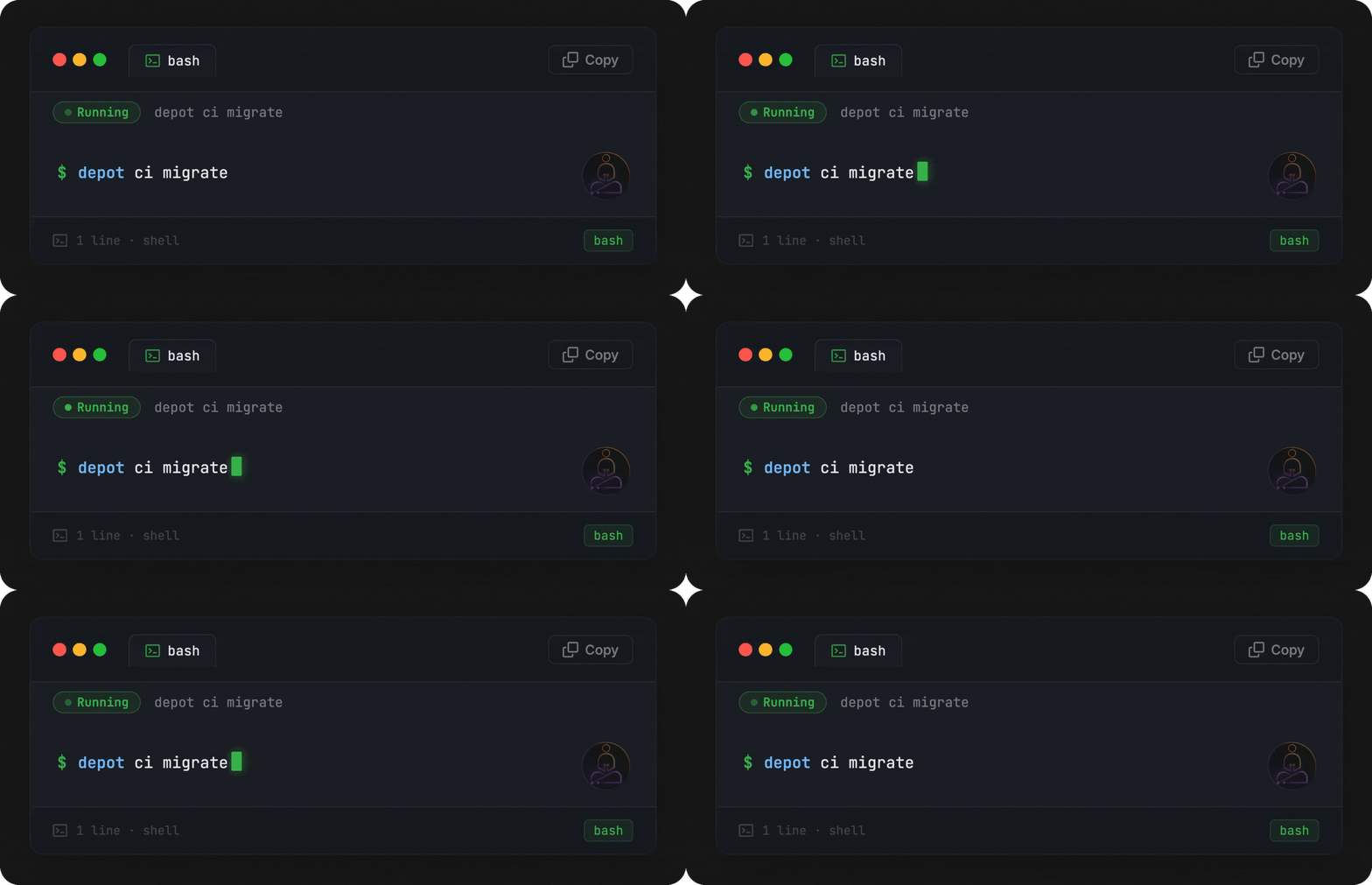
That’s it. The CLI scans your .github/workflows/ directory, checks each workflow for compatibility, and copies your selections into .depot/workflows/. Your original .github/ folder stays untouched. GitHub Actions keeps running in parallel while you test Depot CI.
If your workflows reference secrets, the wizard catches those too and prompts you to configure them. Or you can supply them inline and skip the prompts entirely:
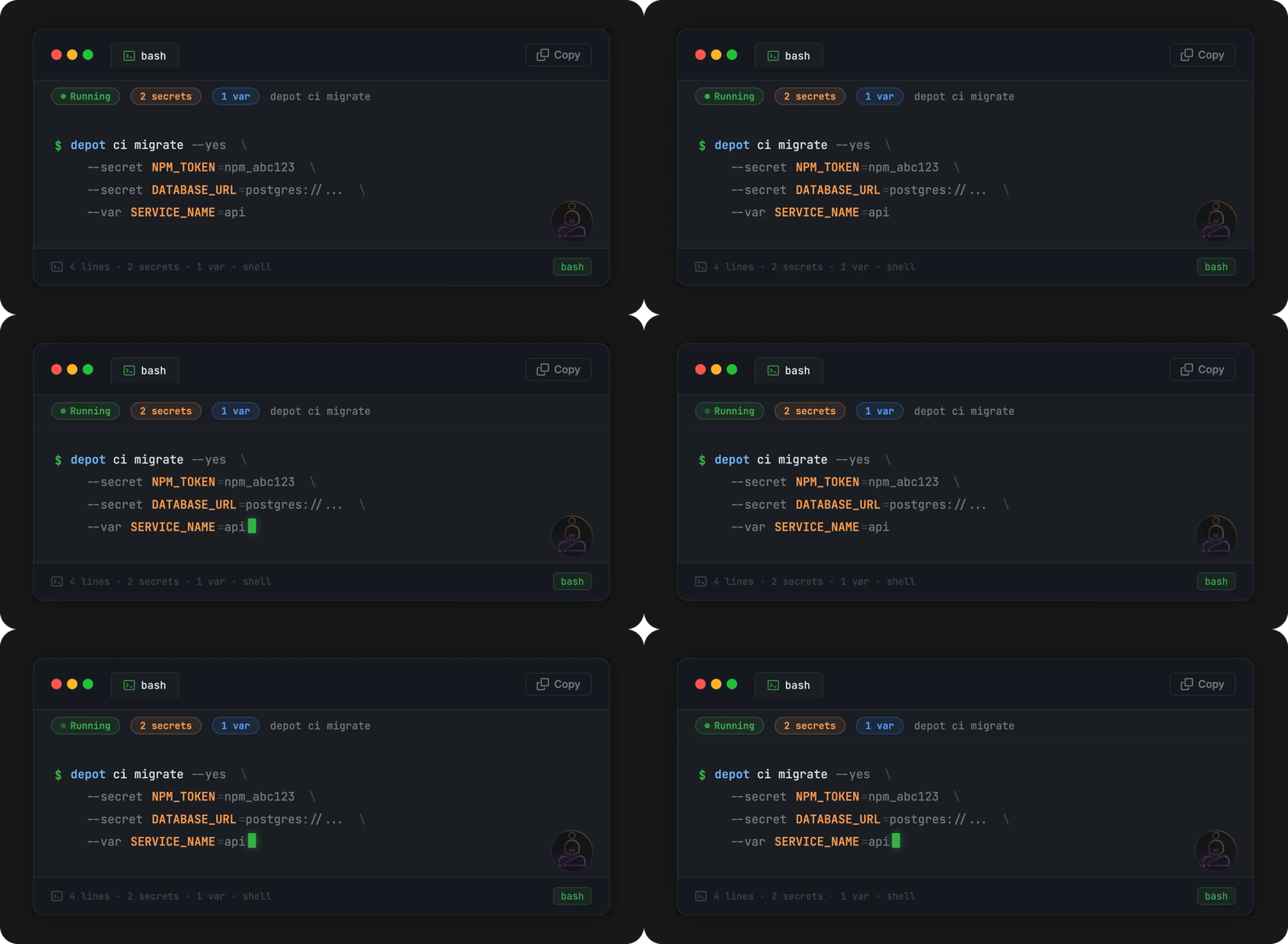
One thing to be aware of: once you push that .depot/ directory, both pipelines run simultaneously. If a workflow triggers a deploy or writes to an artifact store, it’ll fire twice. Keep that in mind before you merge.
Container builds get the same treatment. Depot’s build product gives Docker layer caches a persistent home on remote infrastructure, so the warm cache from yesterday’s build is available today. For teams with large images and complex multi-stage builds, this changes the build time profile significantly.
Observability is another meaningful difference. Most CI platforms give you logs. Depot gives you full job observability, including SSH access into a running job and the ability to replay from a specific step when something fails. Debugging a flaky test or a strange environment issue becomes something you can actually investigate, rather than just re-run and hope for a different result.
Depot CI has a free trial at depot.dev. Container builds and Depot CI are both available. Depot CI launched March 24th.
The Trade-offs
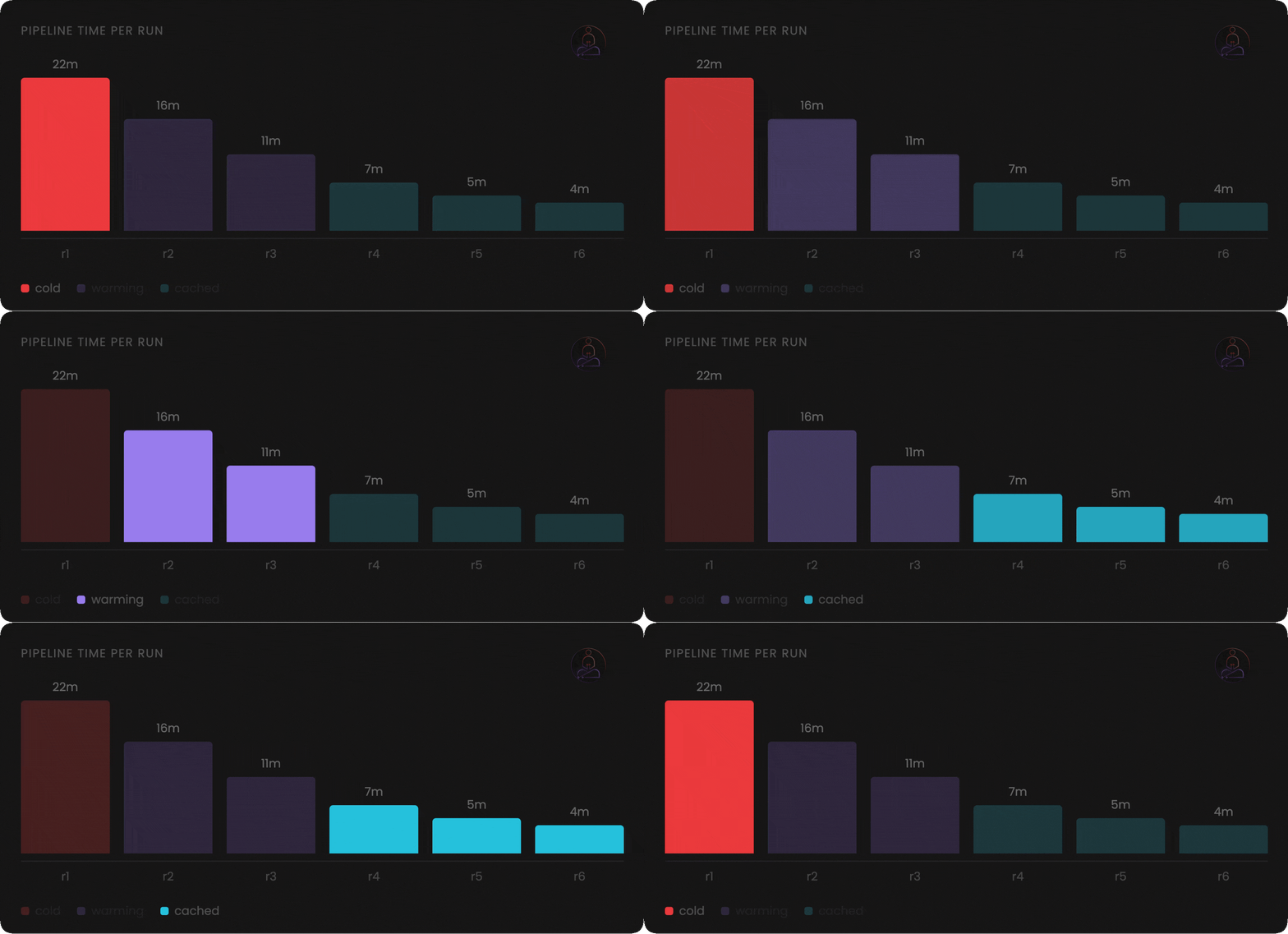
Persistent compute is not strictly better. It is a different set of trade-offs.
Warm state that makes builds fast also means state can linger unexpectedly. A previous run that left a file in the wrong place, a corrupted cache entry, an environment variable that carried over: these are problems the stateless model eliminates by design. Well-built persistent systems isolate at the job level, but the operational model requires more deliberate thinking.
Cold starts still happen. When you first onboard a project, or when caches are invalidated, you pay the full startup cost. The speed advantage compounds over time, not on the first run.
Migrating workflows is low friction but still a migration. Understanding what you are adopting, and what moving away would require, is worth thinking through before committing at scale.
These are not reasons to avoid the approach. They are reasons to evaluate it clearly rather than treating faster CI as unconditionally free.
The Broader Pattern
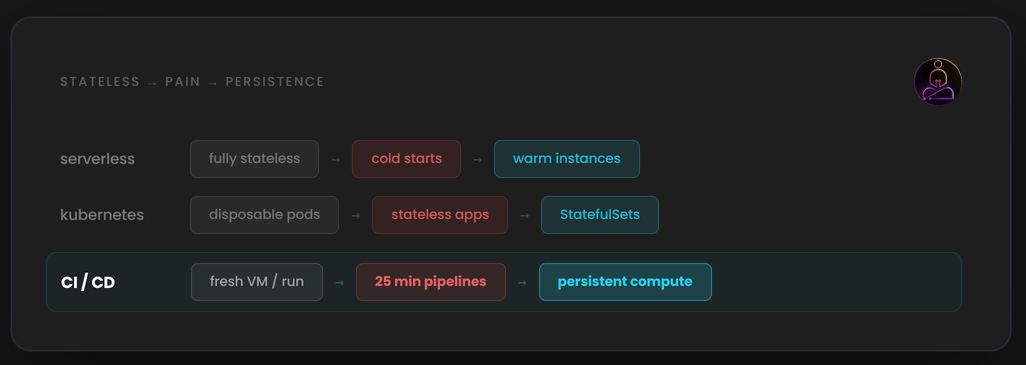
The shift from stateless to stateful infrastructure is a recurring theme in platform engineering.
Early serverless functions were completely stateless. Cold starts were painful but acceptable. As teams moved latency-sensitive workloads onto serverless, the cold start cost became a real problem. Providers added warm instances, provisioned concurrency, and connection pooling. The stateless model was clean. The performance reality forced persistence back in.
Early container orchestration treated every pod as disposable. Real applications needed state to live somewhere. Persistent volumes, StatefulSets, and local storage abstractions followed.
CI is going through the same evolution. The stateless runner model solved real problems when it was introduced. Reproducible builds. Strong isolation. No operational overhead.
What is changing is that the default assumption of ephemerality is being questioned. For a long time, starting fresh felt safe. Predictable. The cost was slow pipelines, and teams accepted that as the price of clean builds. That trade-off made sense when pipelines were short and teams were small. At scale, it quietly became the thing slowing everyone down. The architecture that made CI simple is now what makes it slow. And that is worth knowing, whether you change anything or not.
Thanks for reading. If you have questions or want to push back on anything, the comments are open.
Dear Himalay,
I am writing this to you with immense gratitude. My name is Sylesh, and I am currently a 2nd-year Computer Science Engineering student at the Chennai Institute of Technology. I come from a middle-class background, and while I actively use AI to learn, I genuinely believe there is no better mentor to learn from than you. I am a huge fan of both your YouTube tutorials and the incredible architecture video editing you incorporate into them.
I previously purchased your System Design tutorials using the $24.50 student offer, and it completely changed my trajectory. Because of the deep architectural knowledge I gained from your classes, I secured an internship at ZOHO in my 3rd semester, and now another internship at CTS for my 4th semester. Your teachings helped me become a finalist in multiple government-led hackathons, and I’ve even been able to use that knowledge to mentor my friends and present to my teachers. Sincerely, none of this would have been possible without you.
I am reaching out today because of your recent video about the "Claude mythos" and the launch of your new Cybersecurity course. To be honest, I never had much interest in cybersecurity before, but that video completely hooked me. With AI rapidly occupying every space in the industry, I want to stand out. I want to take this knowledge back to my community and push my peers to think beyond just standard Full-Stack Development systems. Even though you mentioned the course is geared toward established software engineers, I already approach my work with a software engineer’s mindset and feel fully equipped and eligible to tackle it.
However, I am currently facing a strict financial roadblock. At $59, the course is unfortunately out of my reach right now. With my college placements starting in exactly three months, my time will soon be entirely consumed by DSA preparation. This makes right now the absolute critical window for me to learn cybersecurity.
I completely understand the immense effort, time, and value you put into your content. Because I desperately do not want to miss out on learning this from you at such a pivotal moment in my career, I am humbly begging for your help. Would it be at all possible to provide a discount for students or past buyers of the System Design course? Alternatively, I am completely ready and willing to pay the full amount later, or through an EMI/installment plan after three months once I am in a better position.
Thank you so much for reading this, for your consideration, and for the massive impact you have already made on my career. I hope to hear from you soon.
With deepest respect and gratitude,
Sylesh